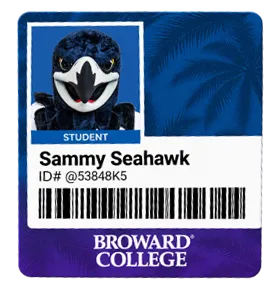
To complete the Broward College Student ID requirement, students may either submit a photo online for a Virtual Student ID or visit a campus Student Life Office to have their photo taken.
Broward College offers a Virtual Student ID through Online Photo Submission, allowing students to complete the process remotely.
How to Get Your Student ID Card
On-Campus
Visit a Student Life office to get your student ID.
- Have your student ID number available
- Have a valid government-issued photo ID (driver's license, passport, etc.)
Online

- Log in to One Access
- Click the Online Photo Submission tile

If you do not see the tile, click Company: Everything or search for 'Online Photo Submission' - Upload a photo that meets the photo requirements
- Upload a valid government-issued photo ID (driver's license, passport, etc.)
- Click the button below to upload your Student ID Card photo
The Photo ID Office will review your submission, which may take up to two (2) business days.
Photo Requirements
Camera (webcam or mobile camera) access is required to submit a photo
To ensure your photo is approved, please follow the guidelines below:
- Use a plain background, such as a solid wall or poster board
- Must be a high-quality color photo
- Face the camera directly with your head upright
- Position your face and shoulders centered in the frame
- Make sure only you are visible in the photo
- Ensure the image is well-lit and in focus
Photos will not be accepted if they include:
- Hats or sunglasses
- Glare on glasses
- Shadows, red-eye, or blurry images
- Filters, glamour/debutante-style editing, or heavily retouched photos
- Background patterns, scenery, or visible objects/people
- Images that are too dark, too bright, too close, or too far away
Virtual ID
The Virtual Student ID is an official Broward College ID and is accepted everywhere on campus. Students can use an Online Photo Submission to submit a Virtual ID photo without ever setting foot on campus.
View Virtual Student ID
- Log in to myBC
- Click on My Account OR search for the 'Virtual Student ID' to access your Virtual ID
Pro Tip
Take a screenshot of your Virtual Student ID and save it to your favorites for easy access later.
Locations & Hours of Student Life
Offices
North Campus (Building 46 | Room 133)
Central Campus (Building 19 | Room 101)
South Campus (Building 68 | Room 190)
Office Hours
Monday - Thursday: 8 a.m. - 5 p.m.
Friday: 9 a.m. - 4 p.m.
What You Can Access with Your ID Card
- Any campus Fitness Center
- Any Academic Success Center (ASC)
- Music, theatre, dance performances, and art exhibits on campus
- Discounted Dental Clinic and Vision Clinic
- Easy on-campus printing with our Pay-for-Print system
- Electronic resources in the U/C Library, including research articles, e-books, online art collections, and streaming music and video collections
Lost or Stolen ID
The Virtual ID will eliminate your need for a physical copy, unless your academic program requires one. Most students will not need to worry about replacing a lost or stolen ID.
Report Lost or Stolen ID
Show the police report to Student Life for a free replacement. The police report must contain the case number and must list the ID as a stolen object.
If you lost your ID, you may be able to find it in the lost and found in Campus Safety.
If the ID is still lost or you are unable to provide proof it was stolen, you will need to pay $15 for a replacement.
For technical assistance, please contact the Help Desk: 954-201-7521.